Focal Easy Guide to After Effects: For New Users and Professionals

An After Effects composition is the amalgamation of virtually countless elements, features, and computational operations. Some of these operations are spread across multiple layers and resources, while other operations are targeted at individual layers.
Advanced Timeline Operations will focus on preparing, adjusting, and manipulating single resource layers through:
Drag and Replace swap resources in a single Comp or across an entire project (multiple Comps and layers) effortlessly.
Replace Footage change resources globally.
Advanced Masking the Pen Tool and RotoBezier.
Text Tool typewrite on the screen.
Footage Speed Changing Frame Blending, Constant and Time Remapped Footage.
Of all the great productivity features (Precomping, Parenting, 3D Layers), perhaps the greatest is the all-powerful Drag and Replace function.
Editors How many times have you created multiple variations of one project and spent hours making copies of resource files, links, and reapplying effects?
Designers When working in Photoshop, how many times have you had to swap one layer in one Comp into another, re-link adjustment layers, and change scale, position and rotation to match the original s transforms?

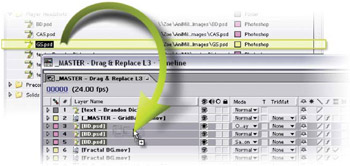
Drag and Replace does all these tasks in one simple mouse action to footage files and compositions alike.
It s as simple as selecting, in the Timeline Window, the file/s that need replacement. With Alt depressed, drag from the Project Window the new file to replace the selected file/s in the Timeline Window. When you release the...