Focal Easy Guide to After Effects: For New Users and Professionals

This stage of After Effects is the closest thing you get to pressing the Make Art button and presto!, out pops your masterpiece. Here is where all the creativity, hard work, and exhaustion come to fruition. And it s here that you ll quickly discover whether you need to buy another, faster computer or invest in a Render-Farm.

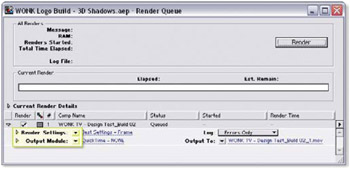
Open the project RenderMe.aep. The Render Queue instructs After Effects how and where to build your project, what to do with it after it s complete, and monitors the progress of Renderings.

The Render Queue consists of two modules:
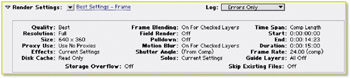
Render Settings determines the technical operations to be performed as the render progresses.
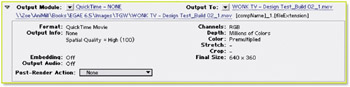
Output Module assigns the file format options and additional operations to be applied to the file as it is recorded.
To display detailed information about each module s current settings, twirl open the arrows next to each module title.

The first module, Render Settings, is essentially the opposite of the Interpret Footage dialog for imported resources it s the Export Interpretation settings menu. With this module you assign your project s: quality, size, output time range, interlace options, and whether or not additional composition effects are applied. Many of the Render Settings options can be left to Current Settings or their default settings. However, some settings must be activated and modified in order for your project to look and perform its best.

The second module, Output...