Configuring and Troubleshooting Windows XP Professional

Learn and master how to configure and troubleshoot Windows XP Professional.
 TABLE OF CONTENTS
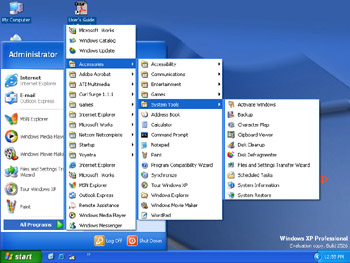
 The first system tool we examine is the Disk Defragmenter, which you can run by selecting Start All Programs Accessories System Tools (see Figure 5.1). The purpose of this tool is to reorganize the occupied space of a disk volume within Windows XP, so that each file is written to a contiguous part of the volume.
You should understand that Windows will writes files to a disk block-by-block, based upon a list of free data blocks. Although Windows tries to find the largest free contiguous space on the volume, a large file can still be divided over more than one free volume area; this occurs when the free areas are all smaller than the file size. In extreme cases, each block of a file can be located on different part of the volume. For example, if you have a large file that needs to be divided over three free areas, the first block could be located at the beginning of the hard disk, the second block could be located somewhere at the end, and the third block could be located in the middle. Every time you open this file, the head of the disk must move first to the beginning, then to the end, and subsequently to the middle of the volume to retrieve the file. It goes without saying that each time the head needs to move to different portions of the volume...