Configuring and Troubleshooting Windows XP Professional
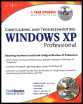
Learn and master how to configure and troubleshoot Windows XP Professional.
 TABLE OF CONTENTS
 Of all the System Tools we discussed in this chapter, or even in this book, the Backup tool is perhaps the most important one, and perhaps the least used. We have the tendency to think that nothing bad will happen to us, so we don t need to back up our files. Other reasons why we do not back up include the lack of functionality of the backup tools, the fact that you cannot work on the computer while you do backups, the time it takes to perform a backup, and the fact that many people find the process bothersome. If you did not use the backup tool of Windows 98/Me because of these reasons, you will be happily surprised with the Backup tool for Windows XP. It is a leap forward; in fact you can even call it a full-blown professional tool. Windows 2000 users may already be familiar with the tool, because Microsoft used much the same backup tool for that operating system, although it does have certain differences. Microsoft teamed up with Veritas Software Corporation (www.veritas.com) a renowned manufacturer of backup software to come up with this tool. Before working our way through the Backup tool, let s first list its functionalities.
Here are the most important features of the Windows XP Backup tool:
Easy selection of what has to backed up, ranging from a complete volume to a single file (also remote folders and removable storage).
Easy selection of what must be restored,...