Creating Motion Graphics with After Effects Volume 1: The Essentials, 2nd Edition

Learn how After Effects works and get firsthand experience with the features award-winning artists use.
 TABLE OF CONTENTS
 Getting files in, deciding how After Effects should interpret them and changing your mind later.
This reference chapter will discuss specific issues regarding importing different types of footage items as well as entire projects into After Effects. Central to handling the footage you import is the Interpret Footage dialog, where you indicate how After Effects interprets and handles your source files as it hands their images off to your comps. If you are a relative beginner and are not yet comfortable importing items into After Effects, we suggest you also work through Chapter 1.
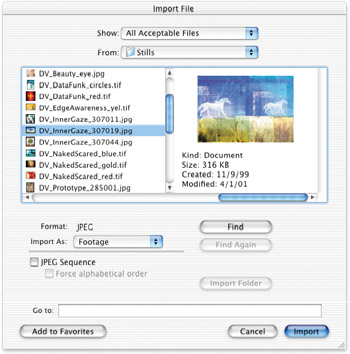
After Effects has consolidated the importing of movies, stills, sequences, layered files, 3D camera data, folders, and projects into one dialog: File>Import>File, accessed with the keyboard shortcut Command+I on Mac (Control+I on Windows), or by simply double-clicking in an empty area of the Project window. This broad range of file format choices means you have to pay special attention to the options displayed at the bottom of the Import File dialog, as it can have a big effect on how the item selected is imported. Also be aware that imported files are sorted into whichever folder is currently active in the Project window.