AutoCAD 2007 and AutoCAD LT 2007: No Experience Required

Understanding coordinate systems
Drawing your first figure
Erasing, offsetting, filleting, extending, and trimming lines in a drawing
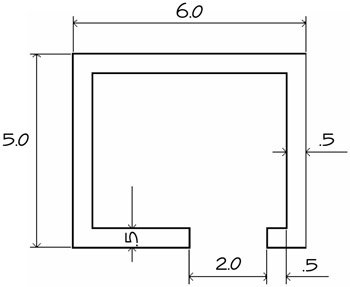
Now that you've taken a quick tour of the AutoCAD and LT screens, you're ready to begin drawing. In this chapter, you'll be introduced to a few basic commands used in drawing with AutoCAD and AutoCAD LT. To get you started, I'll guide you through the process of drawing a box (see Figure 2.1).
You need to use only five or six commands to draw the box. First, you'll become familiar with the Line command and how to make lines a specific length. Then I'll go over the strategy for completing the box.
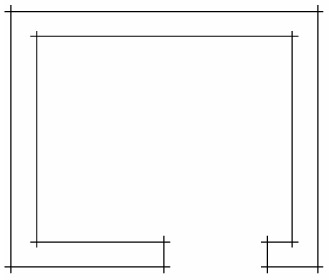
In traditional architectural drafting, lines were often drawn to extend slightly past their endpoints (see Figure 2.2). This is no longer done in CAD except for special effects.
The Line command draws a line between locations on existing lines, between geometric figures, or between two points that you can choose anywhere within the drawing area. You can designate these points by clicking them on the screen, by entering the x and y coordinates for each point, or by entering distances and angles. After you draw the first segment of a line, you can end the command or draw another line segment from the end of the first one. You can continue to draw adjoining line segments for as long as...