AutoCAD 2007 and AutoCAD LT 2007: No Experience Required

Chapter 4: Gaining Drawing Strategies: Part 1

Overview

  • Making interior walls

  • Zooming in on an area using various zoom tools

  • Making doors and swings

  • Using object snaps

  • Using the Copy and Mirror commands

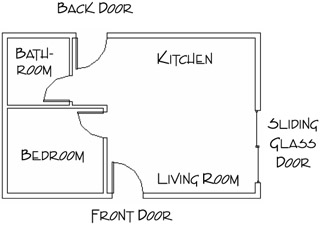
Assuming that you have worked your way through the first three chapters, you have now successfully drawn a box (Chapter 2) as well as the outer wall lines of a cabin (Chapter 3). From here on, you'll develop a floor plan for the cabin and, in Chapter 8, elevations (views of the front, back, and sides of the building that show how the building will look if you're facing it). The focus in this chapter is on gaining a feel for the strategy of drawing in AutoCAD and on how to solve drawing problems that come up in the course of laying out the floor plan. As you work your way through this chapter, your activities will include making the walls, cutting doorway openings, and drawing the doors (see Figure 4.1). In Chapter 5, you'll add steps and a balcony and place fixtures and appliances in the bathroom and kitchen.


Figure 4.1: The basic floor plan of the cabin

Each exercise in this chapter presents opportunities to practice using commands you already know from previous chapters and to learn a few new ones. The most important goal is to begin to use strategic thinking as you develop methods for creating new elements of the floor plan.

Tip

Because you'll be doing quite a bit of drawing in this chapter and the next one, this...

UNLIMITED FREE
ACCESS
TO THE WORLD'S BEST IDEAS

SUBMIT
Already a GlobalSpec user? Log in.

This is embarrasing...

An error occurred while processing the form. Please try again in a few minutes.

Customize Your GlobalSpec Experience

Category: Balcony Systems
Finish!
Privacy Policy

This is embarrasing...

An error occurred while processing the form. Please try again in a few minutes.