AutoCAD 2007 and AutoCAD LT 2007: No Experience Required

Accessing the Autodesk websites
Sending AutoCAD drawings with e-mail through eTransmit
Publishing an AutoCAD drawing to the Web
Linking an object in an AutoCAD drawing to a website
AutoCAD 2007 contains a set of tools designed to make it easier to use with the Internet. They range from simple utilities to a wizard that leads you through the process of publishing AutoCAD drawings on the Web. In this chapter, we'll take a brief look at some of these tools.
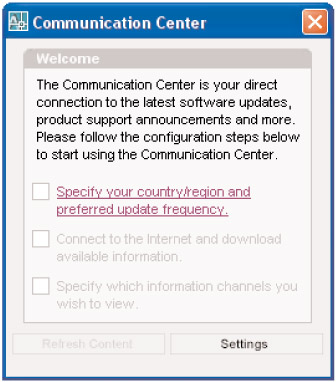
In the lower-right corner of your AutoCAD screen is a small icon that looks like a satellite dish with a yellow triangle in front of it. Click it. If the Communication Center has not been set up yet, you'll see a window like the one here.

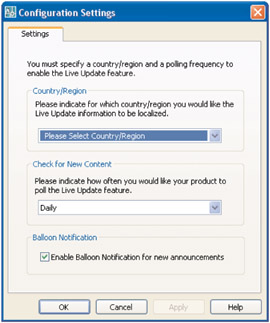
The check boxes are unavailable until you click the text next to the upper check box, select your country, and specify how often you want to be updated in the Configuration Settings dialog box (see Figure BC.1). You have four choices for frequency of update: daily, monthly, weekly, and on demand. At the bottom, check the Enable Balloon Notification For New Announcements check box if you want AutoCAD to display a balloon on your screen when new updates become available.
Once you've completed and applied your information and choices in the Configuration Settings dialog box, you return to the Communication Center Welcome window. The upper check box is checked, and the text next...