Building the Power-Efficient PC: A Developer's Guide to ACPI Power Management

This book provides developers and integrators with practical knowledge and design techniques for building PCs that address the increasing demand for energy conservation.
 TABLE OF CONTENTS
 In this chapter, we ll trace through some key sequences what we call scenarios to show you how ACPI controls power management, and what happens in the hardware, drivers, and operating system. The key sequences for scenarios in this chapter are power up, going to sleep, and waking up. All the scenarios highlight the key dynamics of ACPI, transition from one power-managed state to another, because ACPI power management is at its core a mechanism for maintaining a computer in the lowest power state consistent with its operational requirements. Power management has two key elements one is to sense operational requirements and determine the correct power state, and the other is to make transitions from one state to another.
Linking those two elements are the power states defined in the ACPI specification and the transitions permitted between different states. Figure 4.1, taken from the ACPI 2.0 specification, shows the global system power states and the permissible state transitions.
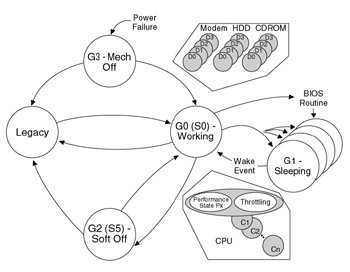
As we discussed in Chapter 3, the global system power states representing the overall power management state of the system include both software and hardware status changes. Application software may or may not be running in a given state, the operating system may or may not require a reboot to return to the operational state, and it may or may not be safe to disassemble the computer.
While the computer is in the G0 global state and actively running programs, both the processor and any attached devices...