BIM and Construction Management: Proven Tools, Methods, and Workflows

Estimating

Extracting quantities, areas, and volumes from a model is one of the most useful functions BIM technology offers. The following tutorial uses a Revit model and shows how to use lnnovaya's estimating tool to extract quantities from the model and then tie them to a Timberline estimate. Other software combinations are also available, such as Vico Software and Beck Technology's DProfiler, with which you can accomplish similar tasks.

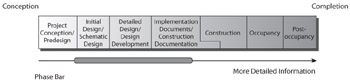
Estimating takes place during preconstruction (see Figure 2.9). The procedure that follows shows how to complete updates. This example assumes that all you have received is a business development model that is in its infancy. You start by gathering square footage start by gathering square footage data and then begin to link model objects with Innovaya for future updating.


Figure 2.9: Project estimating continues from schematic design to construction.

The examples in this book progress in level of detail and become more advanced, simulating an actual construction project. This lets you use the tools as you might encounter them in the course of a typical construction project.

Revit

Autodesk Revit (www.revit.com) is a BIM software modeling program that allows you to design with parametric modeling and drafting elements. In other words, the model is interconnected; a change in one place propagates changes throughout the model. For instance, if a wall is moved 3 feet in plan, that wall now moves in elevation, section, perspective, and all other relative views. The concept of a single database file that can be shared among...

UNLIMITED FREE
ACCESS
TO THE WORLD'S BEST IDEAS

SUBMIT
Already a GlobalSpec user? Log in.

This is embarrasing...

An error occurred while processing the form. Please try again in a few minutes.

Customize Your GlobalSpec Experience

Category: Construction Software
Finish!
Privacy Policy

This is embarrasing...

An error occurred while processing the form. Please try again in a few minutes.