BIM and Construction Management: Proven Tools, Methods, and Workflows

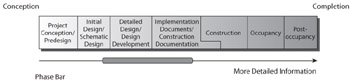
Site coordination begins at schematic design and carries through the construction phase, as shown in Figure 2.32.
Site coordination is important for a construction manager, especially when dealing with dense urban environments or challenging sites. BIM offers tools such as perspective views and walk-through videos to show areas for crews to avoid during certain stages, check crane swings, show vehicular accessibility, and promote safety on site for workers, material hoists, equipment, and scaffolding. These views are called site coordination plans and can be constructed using a path of Revit into Google SketchUp or Revit into NavisWorks. Chapter 3 outlines how to create sequencing videos using NavisWorks. The following sections explain how to export a Revit model into Google SketchUp.
Google SketchUp (http://sketchup.goog1e.com) is a free, intuitive program that is useful during the schematic and conceptual phase of projects for designers who want to understand the tectonics, scale, and massing of a design. You may want to purchase Google SketchUp Pro, which has added functionality and makes file importing and exporting easier.
Designers and architects often make SketchUp models before starting a Revit model, because of cither their familiarity with the program or its ease of use. These SketchUp models can be shared and imported into the Revit model, just as a Revit model can be imported into SketchUp. Unfortunately, when you take the model from Revit into SketchUp, you lose whatever intelligence the model might...