Engineering Design Communication and Modeling Using Unigraphics NX

Appendix

A.1 FILE NAMING CONVENTIONS IN UNIGRAPHICS NX

It is recommended you specify an identifier, file name, configuration, and revision in UG NX file naming.

A file identifier is the identification of the designer. Normally, a person's initials are used.

The model name is a brief descriptive name of the model (the maximum length of the name is 25 characters).

A configuration is normally to identify part or assembly files.

The revision is to specify the number of revisions the model has undergone.

A.2 UNIGRAPHICS NX INTERFACE

  1. Starting window. If UG NX is installed in a window-based system, you can load UG NX in the same way asany other window-based software.

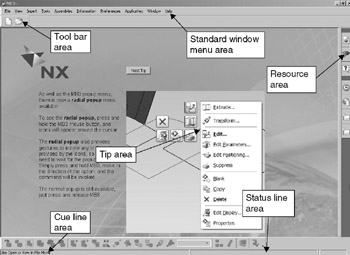
    The starting window of UG NX is nothing else but a greeting page (Figure A-1).


    Figure A-1: UG NX starting window

    In this window, you really cannot do anything except start a new fileor open an existing file, as indicated in the cue line. You need to developa habit of reading prompts indicated in the cue line. For example, the prompt shown in this illustration is either to start a new file or open an existing file.

  2. Gateway window. Upon creating a new model or opening an existing model, the Gateway window (Figure A-3) is entered.

When a new model is wanted, a standard New File Part dialogue window appears, as shown in Figure A-2.


Figure A-2: Starting a new file

In this window, browse to a designated directory and enter the file name for this new...

UNLIMITED FREE
ACCESS
TO THE WORLD'S BEST IDEAS

SUBMIT
Already a GlobalSpec user? Log in.

This is embarrasing...

An error occurred while processing the form. Please try again in a few minutes.

Customize Your GlobalSpec Experience

Category: Computer-Aided Design (CAD) Services
Finish!
Privacy Policy

This is embarrasing...

An error occurred while processing the form. Please try again in a few minutes.