Introduction to Stateflow with Applications
This chapter describes the procedure for creating graphical functions. It begins with an introduction to graphical functions followed by procedures for building a Simulink model to define graphical functions and includes illustrative examples.
Stateflow defines three types of functions: truth table, Embedded MATLAB, and graphical. We described truth table and Embedded MATLAB functions in the previous chapters. In this chapter we will discuss graphical functions.
Like the truth table and Embedded MATLAB functions, a graphical function is an extension of Stateflow actions. We define a program once in a function, and we can call it as many times as we need in Stateflow action language.
We create a Stateflow graphical function in Stateflow diagrams with the following steps:
We select the graphical tool function
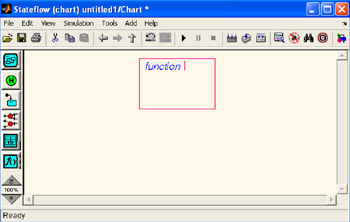
from the Stateflow drawing toolbar in the Stateflow Editor window, we move the cursor inside the empty area of the Stateflow Editor, and we click to place it near the top of the empty area. The graphical function now appears as an unnamed object in the Stateflow Editor with a flashing text cursor as shown in Figure 5.1 below. We save this function as graph_func_stateflow.
Figure 5.1: Unnamed graphical function with flashing text cursor
The syntax of a typical graphical function has a signature of the following form:
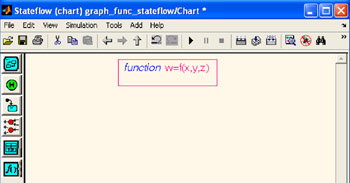
Accordingly, in the Stateflow Editor window we define our function as
and the Stateflow Editor window now appears as shown in Figure 5.2.
Figure 5.2: Named...