Introduction to Stateflow with Applications
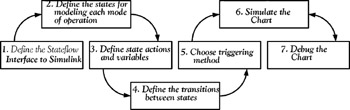
To understand the basic steps for creating a Stateflow Chart, we will present an example and we will follow the procedure recommended by The MathWorks illustrated in the functional block diagram shown in Figure 1.19 below.
ABC Company maintains checking and savings accounts with a local bank. The initial deposit in the checking account is $10,000 and the fixed amount of $10,000 is deposited in the savings account. The company has also established an overdraft protection for up to $50,000, and has made an agreement with the bank that if payments by the bank exceed the overdraft protection, the bank will deduct the excess amount from the savings account.
There will be no fees imposed as long as payments do not exceed present checking account balance and interest at 0.5% will be earned. A fee of 5% will be imposed for overdrafts, and 1% fee will be charged if it becomes necessary to draw monies from the savings account.
To simplify the model, we will assume that no deposits to the checking account are made during the assumed time of payment transactions. When completed, the Stateflow chart will appear as shown in Figure 1.20. This example is similar to the sf_aircontrol model provided by The MathWork's Stateflow documentation.
The Stateflow Editor chart in Figure 1.20 contains six Exclusive (OR) states represented graphically by solid rectangles.