Mastering Revit Architecture 2008

Creating Custom Title Blocks

While you re building a rich BIM model and adding more detail and intelligence in each phase of the project, you also have to document each phase and deliver drawings (sheets) for others. No matter whether you share this information digitally (DWF, PDF) or via printed documents, you need to place information that is company specific (logo and contact information), project specific, and sheet specific on those sheets. Consistency between the sheets is essential.

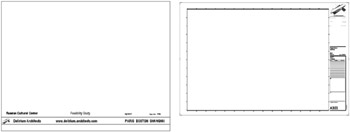
Sheets in Revit can be created in the project environment. Their creation starts with the selection of a title block that can have any shape, graphic layout, and size. Figure 4.40 shows a couple of examples; you ll create the second in this section s exercise. Title blocks are external families you can create any kind of a title block in the Family Editor and add project-, sheet-, or company-specific information on it, both textual and images. (You can include your logo, an image of your project, and any other graphic.) Companies have different title block styles for document-sharing with different parties.


Figure 4.40: Different title blocks: left for presentations, right for construction documents

To use the title block families you ve created in the Family Editor on a sheet, they need to be loaded in the project. If you ve created office standards, the project templates are the best place to store title block families you created on your own. There is no need to create final sheets in the template file loading the title block families is...

UNLIMITED FREE
ACCESS
TO THE WORLD'S BEST IDEAS

SUBMIT
Already a GlobalSpec user? Log in.

This is embarrasing...

An error occurred while processing the form. Please try again in a few minutes.

Customize Your GlobalSpec Experience

Category: Authoring and Publishing Software
Finish!
Privacy Policy

This is embarrasing...

An error occurred while processing the form. Please try again in a few minutes.