Mastering Revit Architecture 2008

Chapter 9: Working with Design Options

Overview

In this chapter, we ll explore how Revit supports workflows where multiple design options need to be explored, evaluated, and presented. This type of workflow is an integral part of developing a design solution. With Revit, design options can range in scale from entire fa ade studies down to kitchen layouts, all in the same integrated model.

You ll acquire the following skills in this chapter:

  • Designing options work in Revit

  • Creating new design options

  • Presenting multiple design options

  • Showing quantities and cost schedules for multiple options

  • Consolidating your options and settling on a final solution

Revit Design Options

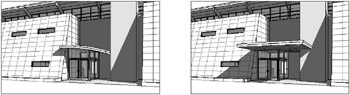
Revit provides a set of tools geared for developing multiple designs in the context of one project. These tools allow you to explore alternative designs without having to constantly save multiple independent versions of your model as you move in different directions. With Revit design options, you create, evaluate, and mock up a wide range of options in the context of your project file. You re free to mock up multiple roof configurations, entry canopies, furniture and office layouts, and stairs anything that can be modeled. Figure 9.1 shows an example of the same model with two different entry canopies. Each canopy belongs to a separate design option that can be displayed or hidden in any view. This lets you create views that show each option so the two designs can be evaluated against one another.


Figure 9.1: Design options being used to explore alternative design solutions

Design options work...

UNLIMITED FREE
ACCESS
TO THE WORLD'S BEST IDEAS

SUBMIT
Already a GlobalSpec user? Log in.

This is embarrasing...

An error occurred while processing the form. Please try again in a few minutes.

Customize Your GlobalSpec Experience

Category: Awnings and Canopies
Finish!
Privacy Policy

This is embarrasing...

An error occurred while processing the form. Please try again in a few minutes.