Mastering Revit Architecture 2008

Chapter 17 covered the transition from design to construction documentation. In this chapter, you will continue building your skills and learn some additional techniques for more detailed construction documentation. As your project experience grows, your library and detailing capacity within Revit will grow with it. This chapter is dedicated to tools and functionality that you can employ after you become comfortable with creating details in Revit. By building your library and knowledge of detailing workflows, you can cut down the time you spend detailing, leaving more time for design.
You will acquire the following skills:
Create 3D details
Add detail components to 3D families
Export details for use in other Revit projects
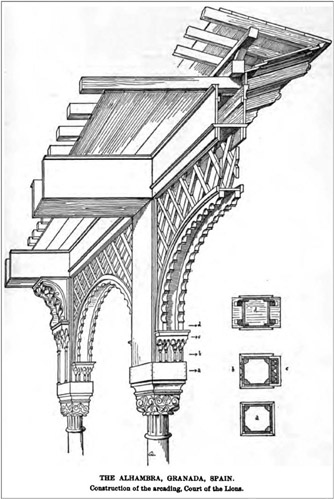
As building designs become more and more complex and the construction industry continues to specialize its assembly methods, it has become imperative that information be communicated effectively between designer and contractor. A technique for showing construction assemblies that goes way back in the history of architectural representation is the use of 3D detail drawings (Figure 18.1) that show a sectional cut through the building in a 3D format (axon or perspective). This type of drawing has been used to convey detail and constructability information rather than create a multitude of abstract sections and elevations. In recent years, this documentation technique has fallen into disuse because it has been difficult or time consuming to re-create such axonometric details in a 2D CAD-based environment.
With Revit s 3D modeling...