Mastering Revit Architecture 2008

In this chapter, we ll explore how to build custom model elements for use in a project. We ll look at how parametric constraints and parameters can be used to build flexible and time-saving content. Building intelligent content is a key feature of Revit and deserves an entire book in its own right, but we will introduce you to some useful concepts and get you going. This chapter will take you through fundamental principles and some compelling use cases using the family editor.
You ll acquire the following skills in this chapter:
Understanding the different types of families and their application
Leveraging nested families for efficiency and flexibility
Building relationships between parameters with formulas
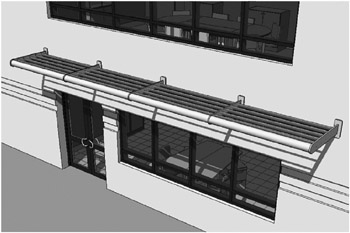
As a design progresses from the generic to the more refined, you ll need to add more detail and realism to your components. This process involves more faithfully representing what will be built and will require you to start building your own families. Although many types of families are provided out of the box or can be downloaded from websites such as the Revit web library or revitcity.com, you ll inevitably reach a point where your design intent isn t matched by existing content (Figure 10.1). This is when you ll need to dig into the Family Editor and create new building components.
Up to now, we ve covered many of the basic principles of families, including family categories, form making, and constraints; but...