Systems Engineering with SysML/UML: Modeling, Analysis, Design

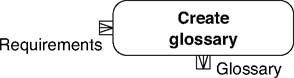
Creating a glossary is shown in Table 2.16.
| Reference card: Create glossary. | |
|---|---|
| | Incoming and outgoing data Requirements: General requirements to the system. Glossary: Description of domain terms for the project. |
| Motivation/description Why? A glossary restricts the playground for free interpretations so typical of natural languages to avoid misunderstandings in the project. What? Describe domain terms from the system environment. How? Describe the terms in text form in the style of a lexicon. Long explanations and formal definitions do not belong to a glossary. Where? A standardized project language that doesn't leave much room for all sorts of interpretations forms the basis for effective working and successful modeling. | |
| Guiding questions
| |
| SysML elements None. |
Creating and maintaining a glossary are activities that continue during the entire project time. The glossary describes all domain terms from the project environment. Rather than defining terms, the glossary explains them briefly and clearly so that any project participant will understand the term unambiguously. It surely happened to you too during your daily project work that unnerving discussions or system errors emerged due to petty misunderstandings.
Our glossary should contain two types of terms: "real" domain terms that not everybody necessarily knows, and domain terms that everybody thinks they know. The second...