The OpenVMS User's Guide, Second Edition
A broad introductory overview of OpenVMS that focuses on command procedures, text editing and system utilities.
 TABLE OF CONTENTS
 Information reaching long-term memory must be filed, and this process depends on the context.
James L. Adams, Conceptual Blockbusting, 1979
Open VMS provides several methods for creating, manipulating, and organizing files. In this chapter, you will
Obtain an overview of OpenVMS files
Become familiar with various forms of file specifications
Begin using wildcards in file specifications
Survey commonly used file management tools
Explore the uses of the /LOG qualifier with various file-handling commands
Distinguish between purging and deleting files
Experiment with the /CONFIRM qualifier when purging and deleting files
Begin exploring the OpenVMS directory system
Begin creating and using subdirectories
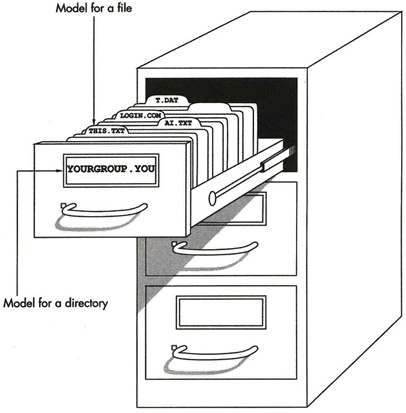
Many OpenVMS command lines identify one or more files to be processed. A file is a named, organized collection of components stored on a hard drive or on media such as magnetic disks and tapes, diskettes, cassettes, or a CDROM. Files are comparable to the file folders in a filing cabinet, as shown in Figure 2.1. Each holds a collection of related information.
Files are useful because they allow you to permanently store and manage information. For example, you can type
$<b class="bold">! See Kenah, Goldenberg, & Bate, p. 625, on logical names</b>
This information would be lost, however, when you press the Return key. To make a permanent record of this reference, you would type
$create logical. nms<b class="bold">See Kenah, Goldenberg, & Bate, p. 625, on logical names</b><span class="inlinemediaobject"><img alt="Image from book"> border="0"> height="11"> id="IMG_46"> src="https://images.books24x7.com/bookimages/id_538/02036a.jpg"> title=""> width="43"></span>