The OpenVMS User's Guide, Second Edition
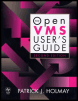
A broad introductory overview of OpenVMS that focuses on command procedures, text editing and system utilities.
 TABLE OF CONTENTS
 At any point during an Open VMS session, you can use the HELP command to get information about working with your system and with DCL commands, qualifiers, and parameters. The HELP command accesses the Help library, which contains information about various topics and subtopics. The command syntax is
<b class="bold">help</b> [<span class="emphasis"><ikeyword</i></span>]
The optional keyword parameter is any Help topic.
If you enter the HELP command without a parameter, a list of topics appears along with the Topic? prompt. You then can type the name of a topic and press the Return key to see information about that topic and a list of subtopics (if any exist). You can enter a subtopic to see information about the subtopic and, possibly, a list of sub-subtopics. You can enter another subtopic or a sub-subtopic.
If you press the Return key without entering a subtopic, you return to the previous Help level (unless you are at the first level; in which case, you exit Help). Alternatively, you can type HELP INSTRUCTIONS or HELP HINTS at the $ prompt to see instructions on using Help or hints about possible commands or topics.
If you want to see the previous screen of text, type a question mark, ?. Press the Ctrl and the letter Z simultaneously, or Ctrl/Z, to exit Help, or press the Return key to back out of the Subtopic? and Topic? prompts. If you enter an unknown topic or subtopic, an appropriate list of topics or subtopics is displayed.