OpenVMS System Management Guide, 2nd Edition

This complete text details the tools, technologies and techniques that can configure, maintain, and tune computers running Hewlett-Packard's high-performance OpenVMS operating system.
 TABLE OF CONTENTS
 Promote a better understanding of HP s software-licensing practices and policies
Provide methods for selecting license types and optimizing their use
Discuss HP s various license-type offerings
Ensure system availability through proper management of software licenses
As a system manager, you are responsible for installing, upgrading, and managing the software products on the systems you support. Consequently, you must ensure that these products are used in accordance with the terms and conditions of associated software license agreements; otherwise, you or your organization could face severe civil and criminal penalties.
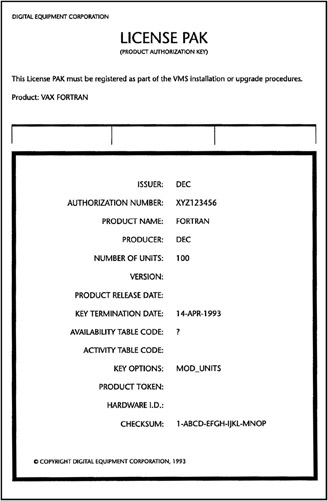
Starting with the advent of consolidated-distribution CD-ROM media, OpenVMS products incorporate a product authorization key (PAK), shown in figure 7.1, whenever you purchase a software license. Before a product can be activated, the PAK for the product must be registered and loaded on the system or OpenVMS cluster for which it is designated. Every time access to a product is attempted, the product checks to see if a corresponding and currently valid PAK has been loaded. If it has, access is granted; otherwise, access is denied.
PAKs are required for the OpenVMS operating system, TCP/IP Services, and DECnet networking products. General system users are not even able to log in to the system if the necessary PAKs are not registered and loaded correctly. Similarly, when you perform system-configuration changes, you may need to update existing PAKs; otherwise, products can accidentally be deactivated. As you can see, system availability depends heavily...