E-Mail Virus Protection Handbook
This book explains to end users, in plain language, what the threats are, and how to deal with them.
 TABLE OF CONTENTS
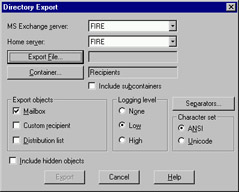
 Sometimes an organization needs to change SMTP addresses for its employees. In an organization with hundreds of Exchange users it would be tedious to manually create SMTP addresses in each mailbox. Thank-fully, it is possible to import multiple SMTP addresses into Exchange from a comma-separated .csv file. We could use the Exchange Export tool to export the list of users on our Exchange Server to a .csv file, which we would then edit in Microsoft Excel to change SMTP addresses (see Figure A.1).
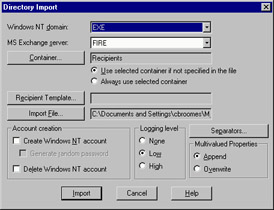
Once the file is saved, we would then use the Import tool to copy the information back to the Directory database (see Figure A.2).
Most of the tasks an Exchange Administrator performs are done through the Exchange Administrator program. The Administrator program is launched from the Exchange program group. However, for more advanced viewing of the properties of the object, we can also launch the Administrator program from the command line in what is known as raw mode. Figure A.3 shows how to launch the Administrator program in raw mode.
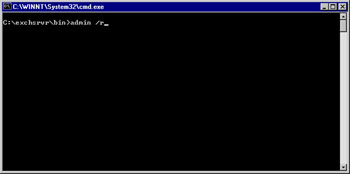
Raw mode (admin.exe /r) allows you to see all the properties of objects on the Exchange Server. This is useful for examining properties in detail. We can also use the Administrator program in raw...