ASP .NET Web Developer's Guide

Learn to develop Web applications for Microsoft's .NET platform using ASP.NET.
 TABLE OF CONTENTS
 Conventional HTML elements are not programmable at the server side. Their values do not persist in postbacks. These are essentially treated as opaque texts that are passed to the browser. In ASP.NET, we may convert an HTML element to an HTML server control by adding an attribute runat= server. This notifies the ASP Engine to create an instance of the control during parsing. We will, of course, need to specify an ID of the element so that we can manipulate it programmatically at the server side. These controls are particularly useful for migrating ASP applications to ASP.NET applications.
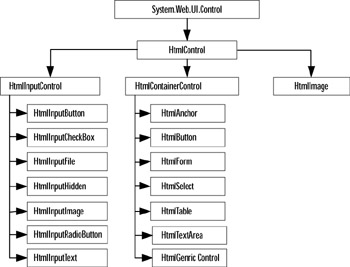
HTML server controls have been derived directly or indirectly from the base class System.Web.UI.HtmlControls.HtmlControl and map directly to HTML elements. The hierarchy of HTML server control classes is shown in Figure 3.27. Basically, the hierarchy divides the classes into three major categories: the classes that mimic the HTML tag, the classes that may act as container classes, and finally the HtmlImage class. Several classes in the second category also employ the HTML tag. HTML server controls must reside within a containing control with the runat= server attribute.
In this section, we will present a number of examples of HTML server controls. If you are relatively new to ASP, be sure to go through these examples. Most of these examples can also be enhanced using the Web controls. Most importantly, the concepts learned in this section will enable you...