ASP .NET Web Developer's Guide

Learn to develop Web applications for Microsoft's .NET platform using ASP.NET.
 TABLE OF CONTENTS
 In our previous example, we have placed a certain amount of VB code inside the .aspx file. We will refer to this practice as In-Page coding (also referred to as inline coding by some programmers). In ASP days, all ASP applications had to be developed using in-page coding because that was the only way to develop an ASP page. (In those days, the ASP developers envied the VB developers, because the VB developers had a nice way to split their codes and visual presentation.)
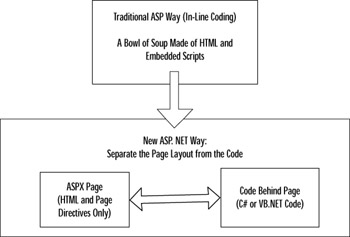
Often, the intermixed HTML and scripting codes in a large page become cryptic and difficult to read and maintain. Fortunately, ASP.NET provides a way out of this problem. We may develop the html code in a file with an .aspx extension, and then we may write the necessary code in a separate C# or VB code file. This practice is known as Code-Behind. Basically, the Code-Behind follows the Visual Basic model of developing an application. Here, we develop an .aspx file where we define the layout of the controls in a page, and then we include the code in a separate VB or C# class file. As shown in Figure 3.17, this mechanism separates the page layout design activities from the code development activities. When we develop an ASP.NET application using VS.NET, we are automatically forced to use Code-Behind.
Obviously, the .aspx file has to be somehow linked to the class...