ASP .NET Web Developer's Guide
Learn to develop Web applications for Microsoft's .NET platform using ASP.NET.
 TABLE OF CONTENTS
 We may develop our own server controls by extending an existing control or a group of controls to provide additional functionalities. As stated earlier, there are two versions of custom controls: Web User Controls and Web Custom Controls. The Web User Controls are easy to develop and these are typically stored as ascx files. The Web Custom Controls require in-depth knowledge of Object Oriented Programming and CLR. These are stored in compiled form as assemblies.
A user control, if developed correctly, functions like any other controls. It can be placed inside any other host ASP page (often called the Consumer of a control). In this section we will provide two examples on how to develop and use a Web User Control. In the first example, we will develop a very simple user control. In the second example, we will develop a user control that will expose some of its properties to its host page class.
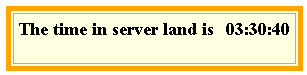
Suppose that we want to build the control as shown in Figure 3.88. If a host page embeds this control, it will automatically display the current time in the server s time zone. Once we build this control, we can use it in any subsequent page. We will provide a step-by-step procedure to build this control.
Develop the necessary code for the control. The code for this example is shown in Figure 3.89...








