ASP .NET Web Developer's Guide
Learn to develop Web applications for Microsoft's .NET platform using ASP.NET.
 TABLE OF CONTENTS
 Your first case study is a simple online guestbook application, completely coded in ASP.NET. You are going to need to provide the basic functions through this guestbook, namely the ability to do the following:
Enable guests to enter messages.
Display all messages on one page.
Show author, e-mail address of author, and comment from the author of the message.
The flowchart in Figure 11.1 shows the user interaction process that you want to achieve.
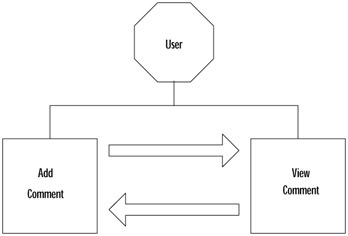
In essence, the user will come to the site and decide if he or she wants to view previous messages or add new messages. The user will be redirected to the view comments page after filling out a new message, or the user viewing the messages has the option to fill out a message.
| Note | In the CD there are two folders for this chapter, representing two ways of going about this guestbook: one is labeled basic and the other is labeled advanced. We are going to explore both of these. |
All of these functions need to be kept as compact as possible. Our backend needs to store the following information for every message that is left on the guestbook:
Name
Subject Line
Actual Comment
The Name, E-mail, Subject Line, and Actual Comment need to be required fields and you need to provide validation for the e-mail field. Also, you need to provide the user with an easy-to-use interface. A basic interface would consist of the user being...