ASP .NET Web Developer's Guide

Learn to develop Web applications for Microsoft's .NET platform using ASP.NET.
 TABLE OF CONTENTS
 Now that we ve gotten XML under our belt, let s start working with ADO.NET. A good way to really see what ADO can do is within the frame of a shopping cart application. In this chapter, we will create a shopping cart application for a fictitious online bookseller called Book Shop.
To enable online shoppers to purchase books from our site, our shopping cart application must be able to: authenticate users, show current contents of the cart, and enable add, update, and checkout operations.
We will also need to create a catalog that our shoppers can browse through to add items to their cart. Users should also be able to query books by category and view a range of books at a time. In order to achieve these goals, we will create the following:
A database to store all book details
Stored procedures (MS SQL 2000) or parameterized queries (MS Access 2000) for all add, update, delete, and retrieve operations
Web Services that will handle all database interactions
Web Services Description Language (WSDL) Web references to our Web Services
Server-side classes that will connect the Web Services with our user interface (UI)
Web interface for displaying both our catalog and cart
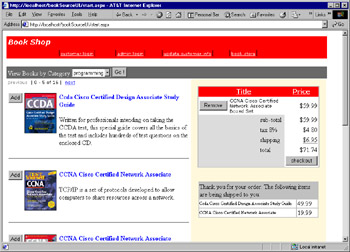
We will also need to create admin interfaces to handle add, update, delete, and retrieve operations for our customers (site users) and site administrators. The interface that will be created in our example can be seen in Figure 12.1.