Monitoring and Managing Microsoft Exchange 2000 Server
Presents best practices and innovative everyday techniques for running Exchange Server for Windows 2000.
 TABLE OF CONTENTS
 Using System Manager, you can define global SMTP configuration settings such as message size limits, recipient limits, and options to prohibit junk e-mail:
Start the System Manager from the Windows 2000 Start menu by selecting Programs Microsoft Exchange System Manager.
Expand the Global Settings section.
Right-click on Message Delivery, and select Properties.
Select the Defaults tab to specify incoming and outgoing message size and to restrict the number of recipients for each e-mail message (Figure 6.2).
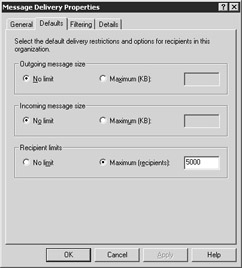
Figure 6.2: The Defaults tab
You can use the Outgoing message size configuration parameter to prevent users from sending large e-mail messages. Select either No limit or Maximum (KB) and enter a value for the maximum message size that can be sent. If a user attempts to send an e-mail message that is larger than the specified value, the message will be returned to the user as undeliverable.
The Incoming message size configuration parameter can be used in a similar manner to limit the size of messages being received.
Select either No limit or Maximum (KB) and enter a value for the maximum message size that can be received. Incoming e-mail that exceeds the specified size will be returned to the sender as undeliverable. Setting limits for outgoing and incoming message size prevents large e-mail messages from affecting your network performance and can also save disk space.
You can use the Recipient limits option to restrict the number...