Monitoring and Managing Microsoft Exchange 2000 Server

Presents best practices and innovative everyday techniques for running Exchange Server for Windows 2000.
 TABLE OF CONTENTS
 Each SMTP virtual server you create has parameters you can set. You can modify SMTP virtual server parameters using the following procedure:
Start the System Manager from the Windows 2000 Start menu by selecting Programs Microsoft Exchange System Manager.
| Note | By default, administrative groups and routing groups are not displayed. If you have not already enabled these, right-click on the Exchange organization and select Properties to display the organization properties. Select the Display administrative groups check box to allow the administrative groups to be displayed and select the Display routing groups check box to display the routing groups. You must restart the Exchange System Manager after enabling display of administrative groups and routing groups. |
Expand the Administrative Groups section.
Expand the administrative group (e.g., First Administrative Group) that contains the SMTP virtual server.
Expand the Servers section.
Expand the server that contains the SMTP virtual server.
Expand the Protocols section.
Expand the SMTP section.
Right-click on the SMTP virtual server you want to change, and select Properties. See Figure 6.9.
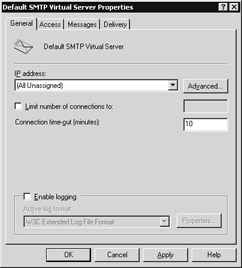
Figure 6.9: The General tab
You can use the IP address drop-down list to change the virtual server s IP address. By default, the SMTP virtual server accepts connections on TCP port 25. You can use the Advanced button to change the TCP port associated with each IP address or to configure multiple identities for this virtual server. If you have multiple virtual servers on the same...