Monitoring and Managing Microsoft Exchange 2000 Server
Presents best practices and innovative everyday techniques for running Exchange Server for Windows 2000.
 TABLE OF CONTENTS
 The SMTP-based message transport uses several different components to ensure reliable and efficient message delivery. Perhaps the best way to explain these components is to examine the flow of a typical message as shown in Figure 6.1.
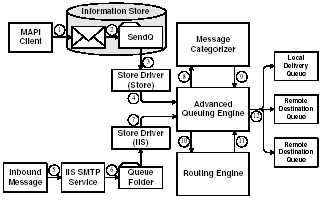
The message flow steps vary depending upon the source of the message. Outbound messages submitted by MAPI clients are initially handled differently than inbound messages and messages submitted by Internet clients. Once the initial processing is completed and the messages are passed to the Advanced Queuing Engine, all messages are handled in the same manner. The message flow is described in the following sections.
The MAPI client submits the message directly to the Exchange Information Store.
The Information Store moves the message to the SendQ folder.
The Store Driver (Store) reads the message from the SendQ folder and constructs an IMAILMSG envelope. The Store Driver (Store) allows the transport to directly read and write files from the Exchange Information Store. Normally, SMTP components pass information using folders located in the \Exchsrvr\Mailroot directory. The Store Driver (Store) prevents the transport from having to copy the submitted message from the Information Store to a folder in the Mailroot directory.
The Store Driver (Store) passes the IMAILMSG envelope and message to the Advanced Queueing Engine.
The remaining message flow steps are described in Section 6.2.3.
When a message arrives, the Internet Information Server...