AutoCAD Pocket Reference, 2008 Edition

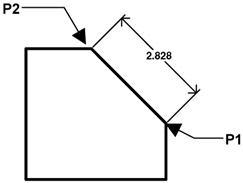
The ALIGNED dimension command aligns the dimension with the angle of the object that you are dimensioning. The process is the same as Linear dimensioning. It requires two extension line origins and placement of text location. (Example below)
Select the ALIGNED command using one of the following:
TYPE = DIMALIGNED or DIMALI or DAL
PULLDOWN = DIMENSION / ALIGNED
TOOLBAR = DIMENSION ![]()
Command: _dimaligned
Specify first extension line origin or
Specify second extension line origin: select the second extension line origin (P2)
Specify dimension line location or [Mtext/Text/Angle]: place dimension text location
Dimension text = the dimension value will appear here