Introducing 3ds Max 2008

In a previous exercise, you turned a boring sphere into an exciting pool ball using Diffuse and Reflection maps. Now let's dive into mapping the rocket we modeled in Chapter 5 to get it ready for lighting and rendering in Chapters 10 and 11, respectively.
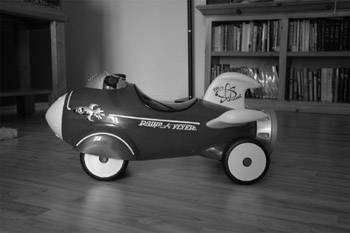
Study the full-color image of the rocket shown in Figure 7.61. (It's also shown in the Color Section of this book.) That will give you an idea of how the rocket is to be textured. Let's begin with the wheels.
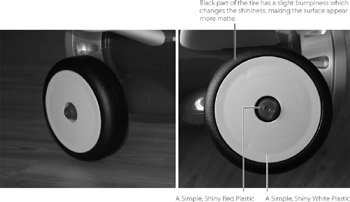
The wheels of the real toy rocket are made of plastic that is fairly smooth, shiny and reflective. The black tires are different from the wheels: they have a rough, bumpy surface (Figure 7.62). The bumpiness breaks up the shininess, similar to what happens when you throw a handful of sand into a pool of water. The surface is still shiny and reflective but is distorted by the bumpiness, giving an appearance of a slightly matte finish.
Since the tire was created from a single primitive, and then modified, we don't have separate objects to which to apply materials. One option is to break apart the object so it has distinct areas (distinct objects), but this method adds an extra complication because we have to manage more objects. To avoid this, we are going to use a texturing technique using Multi/Sub-Object (MSO) materials. This material...