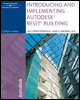
Introducing and Implementing Autodesk Revit Building
Chapter 6: Managing Annotation

INTRODUCTION

So far you have been working on the design tools integrated into Revit Building. In previous chapters you have massed buildings, and added walls, doors, and windows. You have linked models and sites, and shared models with others. The main purpose of building a model is to communicate to the construction team what the design team wants to build. Traditionally, design communication has been in the form of construction documents: printed collections of plans, sections, elevations, and specifications. This may not be the only way to deliver or communicate design intent in the future, but documents of a certain widely accepted appearance are today's standard and will not soon be completely replaced. If a wonderful model of a wonderful building cannot be understood by those who have to approve, pay for, or build it, the building won't be built. Proper annotation is essential to effective design practice.

Revit Building is comprehensive building information modeling software for the full spectrum of architectural practice, so you shall now explore its tools for documentation of your designs. This chapter will contain several sections to illustrate different types of standard documentation and the management of each technique. In the following exercises we will demonstrate techniques for adding, editing, and managing annotation. In the interest of keeping the exercises moving, we will focus on one area of our hypothetical project. Please note that many of these exercises are organized to show you techniques for setting up and managing annotations, and therefore a certain similarity...

UNLIMITED FREE
ACCESS
TO THE WORLD'S BEST IDEAS

SUBMIT
Already a GlobalSpec user? Log in.

This is embarrasing...

An error occurred while processing the form. Please try again in a few minutes.

Customize Your GlobalSpec Experience

Category: Architecture and Architectural Services
Finish!
Privacy Policy

This is embarrasing...

An error occurred while processing the form. Please try again in a few minutes.