Mechanical Desktop 6 ReferencePoint Suite
Use this ReferencePoint for an overview of Mechanical Desktop 6, as well as for tips on creating components, drawing views, and other techniques.
 TABLE OF CONTENTS
 Mechanical Desktop 6 is mechanical solid modeling software developed by Autodesk Inc. This program operates on top of AutoCAD 2002. As a result, all the commands of AutoCAD work in Mechanical Desktop.
In Mechanical Desktop, the entire process of sketching, part modeling, assembling, and generating the drawing views of models is executed in a single file. The files are saved using the .dwg extension. You do not need to use a separate file to create assemblies or generate drawing views.
This ReferencePoint explains the process of creating sketches in Mechanical Desktop and converting them to designer models. In addition, it explains the process of editing features and sketches of the features.
Mechanical Desktop is parametric and feature-based solid modeling software. Parametric-based solid modeling ensures that the geometry of a model is defined by special parameters. You can modify the shape and size of the geometry of the model using these parameters.
Feature-based solid modeling allows you to create a model by integrating more than one feature. You can modify each feature individually because they are separate objects.
Figure 1-1-1 shows the default screen that appears when you start Mechanical Desktop:
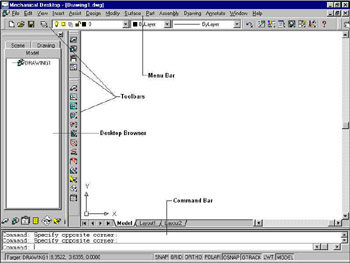
You can invoke commands in Mechanical Desktop by specifying the commands on the command bar, selecting them from toolbars, or selecting the command from the menu bar.
| Note | In Mechanical Desktop, a component is called part. |