Photoshop CS3 for Forensics Professionals: A Complete Digital Imaging Course for Investigators
Crime scene, evidence, and traffic collision photographs sometimes need brightness and contrast adjustments, and images for analysis can benefit from these same adjustments. And these images may need global or localized adjustments. The method for making these adjustments is also the same: utilizing adjustment layers with a Levels or Curves adjustment layer and isolating local areas with adjustment layer masks.
Surveillance videos, tool marks, fingerprints, and many other subjects of visible evidence can be improved with basic contrast adjustments. For our global adjustment example, we'll make an adjustment to a fingerprint image, but the concepts will apply equally to blood spatter, video, tool marks, and other types of forensic images.
| Note | For all the adjustments described in this chapter, as with all chapters, it is important to use valid forensic procedures, as outlined in Chapter 1 which means working on copies of images, using valid forensic tools, and using techniques that can provide repeatable results. |
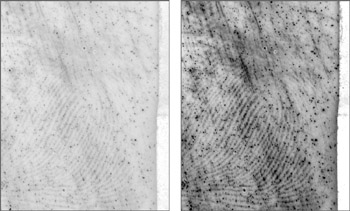
Figure 20.1 is of a typical black powder fingerprint that is of very low contrast because very little powder adhered to the print. I have converted the image to a Smart Object by choosing Layer > Smart Object > Convert To Smart Object. I also view the image at 100 percent magnification to see the information as accurately as possible.
When viewing the image, I evaluate it to determine what the worst problem is. In the...