Compaq Visual Fortran: A Guide to Creating Windows Applications
This guide supplies step-by-step training techniques for building Visual Fortran applications without the knowledge requirement of C or C++.
 TABLE OF CONTENTS
 Compaq Visual Fortran (Visual Fortran) uses the same development environment as Microsoft Visual C++. This development environment is shown in Figure 1.1, and it is known as the Microsoft Developer Studio. In Figure 1.1, the left pane has tabs to select a FileView, a Resource View, and a Class-View. The FileView shows each project and the project files associated with the Workspace. The ResourceView appears if the Workspace uses Resources such as dialogs and icons. The ClassView appears only if Visual C++ is installed. ClassView is not used by Visual Fortran.
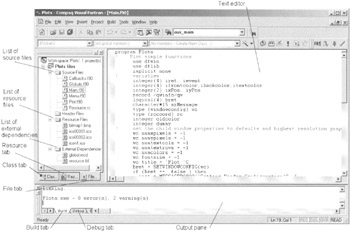
The FileView pane shown in Figure 1.1 contains the files associated with the Workspace for the project Plots. The Source Files folder indicates that there are six files in this project workspace: Callbacks.f90, Globals.f90, Main.f90, Menu.f90, Plot.f90, and Resource.rc. The Resource Files folder contains one bitmap and three icons, while the External Dependencies folder lists the files global.mod and resource.fd. Double-click on any of the file icons in the FileView pane to open that file with the Developer Studio text editor in the right-hand pane.
In the right-hand pane of Figure 1.1, the file Main.f90 has been opened in the default text editor. This editor uses green to identify comments in the code, blue for Fortran standard code, and black for other text. There are actually 12 different "colorable items" (including comments and Fortran keywords), and the default color of each item can be changed in Developer Studio...








