Compaq Visual Fortran: A Guide to Creating Windows Applications
This guide supplies step-by-step training techniques for building Visual Fortran applications without the knowledge requirement of C or C++.
 TABLE OF CONTENTS
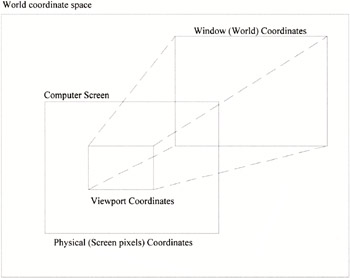
 QuickWin graphics lets you use one of three alternative coordinate systems to describe how to place graphical entities such as lines, geometric shapes, and graphical text on the screen. The three coordinate systems are usually referred to as:
Physical coordinates, which refer to pixels on the computer screen
Viewport coordinates, which represent the pixels within the current viewport
Window coordinates, which are used to define objects or events that occur in a World coordinate space system. Window coordinates are floating-point numbers. The units for a Window coordinate system depend on what is being drawn. For example, a drawing of a house may use meters or feet, whereas a graph showing the variation of air temperature over a 24-hour period would have temperature on one axis and time on the other axis.
The relationship between the three coordinate systems is illustrated in Figure 5.1. The use of each of the three coordinate systems will be illustrated through sample applications.
A physical coordinate system refers to the pixel (picture elements) dimensions in the x and y directions of the screen. The display screen of a computer has an integer-based coordinate axis system with an origin (0,0) located at the top left-hand corner of the screen. Maximum display capabilities depend on the monitor type and screen size. Until recently, most monitors had display capabilities of 640 pixels in the horizontal direction and 480 in the vertical direction. Monitor physical...