Compaq Visual Fortran: A Guide to Creating Windows Applications
This guide supplies step-by-step training techniques for building Visual Fortran applications without the knowledge requirement of C or C++.
 TABLE OF CONTENTS
 Help files add an air of professionalism to an application by providing users with online product information just like any commercial Windows program. Many commercial programs now use the HyperText Markup Language (HTML) format for Help files, and Chapter 4 described how to add such files to an application (QuickWin or Win32) using the Resource Editor. In this chapter, we will create Help files using the program Windows Help Workshop, which comes as part of the CVF Visual Studio package. Appendix B contains information about a newer Help version known as HTML Help.
The creation of a basic Help system requires the following steps:
Collate the information to be included in a Help file.
Create and edit a Rich Text Format (extension .rtf) file of the topics using any suitable word processor.
Enter the required control codes into the topic text files.
Include any graphics.
Create and edit a Help project file (extension .hpj) using Help Workshop.
Compile the source files to produce a Help file (extension .hlp)
Iterate the preceding steps until the Help file meets your application requirements.
We will now develop some Help files to illustrate these steps. Initially we will create a very basic Help file, before going on to examine more advanced options.
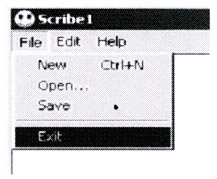
Our first Help project will be to create a Help file for the File menu of Scribe1, as illustrated in Figure 14.1.