Tru64 Unix-Oracle9i Cluster Quick Reference

This quick reference provides step-by-step instructions on setting up Oracle9i RAC to run on a Tru64 UNIX cluster.
 TABLE OF CONTENTS
 Use Figure 4-1 as a guide during the cluster creation. The IP addresses shown in this example will be referenced through the installation. This example shows a minimum network environment; typical production clusters will have additional networks not shown here.
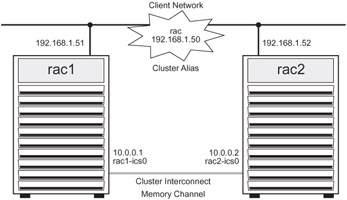
Run the clu_create command to build the cluster, quorum disk, and the first member boot disk. The clu_create command will prompt with a series of questions.
rac1> /usr/sbin/clu_create
This is the TruCluster Creation ProgramYou will need the following information in order to create a cluster: - Cluster name (a hostname which is also used as the default cluster alias) - Cluster alias IP address - Clusterwide root disk and partition (for example, dsk4b) - Clusterwide usr disk and partition (for example, dsk4g) - Clusterwide var disk and partition (for example, dsk4h) - Quorum disk device (for example, dsk4) - Number of votes assigned to the quorum disk - Member ID - Number of votes assigned to this member - First member's boot disk (for example, dsk5) - First member's virtual cluster interconnect IP name - First member's virtual cluster interconnect IP address - First member's physical cluster interconnect devices ...








