Network Tutorial, Fifth Edition

This text is written for those trying to get up to speed or stay current with the complex challenges of designing, constructing, maintaining, upgrading, and managing the network infrastructure.
 TABLE OF CONTENTS
 Intrusion detection has its roots in the financial audits of mainframe computers. The scarcity and expense of mainframes meant that access to their computing power had to be tightly controlled (and users had to be accurately billed). In the late 1970s, financial audits were adapted for security purposes, enabling administrators to review logs for anomalies that might indicate misuse, such as unauthorized file changes.
Further developments led to real-time detection capabilities in the mid-1980s, and to network monitoring in 1990. Today, network managers can choose from a variety of solutions and vendors, but the general principles of an Intrusion Detection System (IDS) remain the same.
The idea behind an IDS is simple: an agent monitors file activity on a host or traffic on a network, and reports strange behavior to an administrator (see Figure 1).
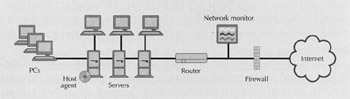
The IDS market is divided into two primary groups: host-based and network-based systems. This tutorial examines the basics of host- and network-based detection systems, discusses how to implement an IDS, and outlines a proper incident-response plan.
Host-based IDSs add a targeted layer of security to particularly vulnerable or essential systems. An agent sits on an individual system for example, a database server and monitors audit trails and system logs for anomalous behavior, such as...