Excel for Scientists & Engineers

For scientists and engineers tired of trying to learn Excel with examples from accounting, this self-paced tutorial is loaded with informative samples from the world of science and engineering.
 TABLE OF CONTENTS
 To make sure that the data entered into your research records are valid, you need some kind of validation. Without validation, users can enter whatever they want into a cell. After validation, there is some form of data entry checking on your spreadsheets.
Here is one way to do validation:
Type a list of valid entries on a separate sheet.
Assign a Name to the list (see Naming Cells on page 6).
Go to the cell(s) in need of validation.
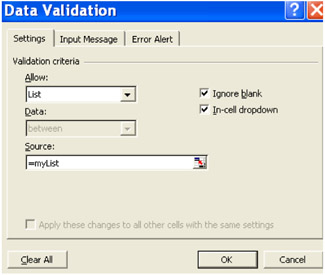
Select Validation in the Data menu.
For Allow, select List.
For Source, select =myList (the equal sign creates a reference to the range so named!)
| Tip | The Allow option also accepts Custom settings. |
Let's say that you want only those values in cell Al that range between 1 and 100. The formula would be:
=AND(A1>0, A1<=100).
Or perhaps, you want cell A1 to only accept values between the minimum and maximum of values in column B:
=AND(A1>=MIN(B:B),A1=MAX(B:B)).
Rule #1: A table of records is demarcated by an entirely empty row and an entirely empty column (empty cells are OK). So avoid empty rows and columns inside your table, for those would create TWO or more tables, which would sort independently.
Rule #2: In order to sort by a specific column, do NOT select the total column, for you would...