Introducing Revit Architecture 2009

In this chapter you'll become acquainted with the graphical user interface (GUI) of Revit Architecture. We explain terminology, menu arrangements, tools, views, common commands, and the basics to get you up and running. Topics we'll cover include:
Overview of the Revit user interface
Modifying and personalizing the interface
Selection and view navigation
Using keyboard shortcuts
Setting up your project environment
Revit file formats
In this section we look at how Revit appears when first opened, out of the box, and familiarize you with how the interface is organized. We explore the use of some standard-looking toolbars and menus, as well as some features that are unique to Revit. One of the things you'll notice from the beginning is that Revit is tailored for the architectural design community. The tools, commands, and objects that you use in Revit are based on tasks and requirements taken directly from the practice of architecture.
| Note | Throughout this book, when we say Revit we're referring to Revit Architecture. It's simpler this way! |
There are several ways to start Revit: by double-clicking the Revit icon that was automatically created on your desktop during installation, by going to C:\Program Files\Revit Architecture 2009\Program and double-clicking Revit.exe, or by double-clicking on any file with the .rvt extension.
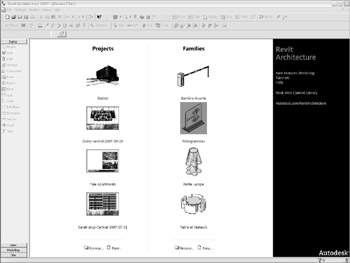
When you start Revit, you see the screen shown in Figure 2.1.
The start page is new to this release of Revit. In...