Introducing Revit Architecture 2009

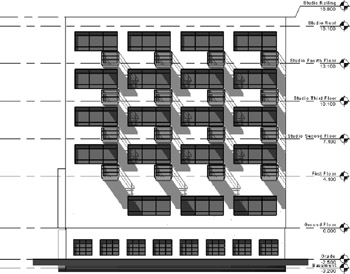
Levels and grids are the horizontal and vertical planes that represent major floor-to-floor divisions (levels) in a building as well as the vertical division of the building into structural bays (grids). In Revit, levels are powerful elements, as just about every model element in Revit has a relationship to a level. When a level elevation is changed, all elements associated with that level also change. Elements such as walls have top and bottom relationships to levels, so that when floor-to-floor heights change in the model, walls won't start to stick through floors or appear too short but will instead adjust to the new base or height of the floor. These smart relationships with the levels reduce the need to manage the vertical position of elements in the model on an individual basis (see Figure 4.1).
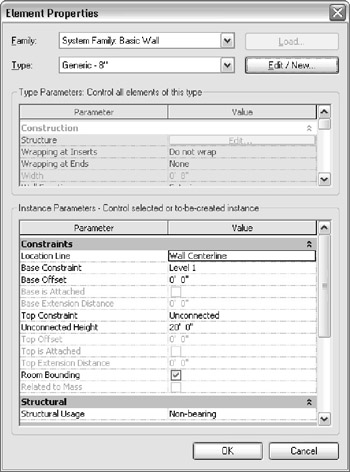
To find out what level an element is associated with, select the element and check its element properties. The word Level will appear for most content. You can see this readily by looking at the element properties of walls, where there are two constraints to levels: one for the base of the wall and one for the top. These parameters are named Base Constraint and Top Constraint, as shown in Figure 4.2. Furniture and fixtures all have a relationship to a level as well. Figure 4.3 shows the element properties of a desk family and its constraint to Level 1.