Introducing Revit Architecture 2009

We've reviewed how to create building elements, generate views, and get these views onto sheets. We also covered how to export the information you create in Revit so that it can be used by other downstream applications.
In this chapter, we'll review paper printing as well as some lightweight digital outputs (PDF and DWF). We'll also look at how to take advantage of Autodesk Design Review in conjunction with Revit as a way to exchange digital markups. We then offer some best practice tips on printing. Topics we'll cover include:
Printing your documents
Revit printing tips
Publishing your BIM data
In this section, we'll discuss a few of the specific settings and commands you'll use to print from Revit. If you've been working in the Windows environment, you'll find that printing from Revit is straightforward, because it's very similar to other Windows-based applications.
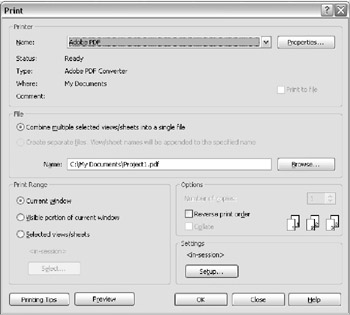
Selecting File ? Print brings you to the dialog box shown in Figure 12.1. All the features for printing are found here.
Printing to a file allows you to create a printing or plot file (.prn or .plt) that can then be sent to a printer independently of the software in which it was created. Creating a .plt or .prn file means you can print many copies of the drawing set, at any time, without having to interrupt your workflow while you print. To print to file, select the Print to File check...