Introducing Revit Architecture 2009

There are many points in the design process where it's necessary to convey your ideas to others. As architects, we use a wide range of representational techniques ranging from the loose napkin sketch to the photorealistic rendering. We use 2D diagrams to convey plans and sections, and perspective views to convey a more human-scaled expression. This chapter will focus on a few techniques that you can use directly with Revit. We'll look specifically at creating color-coded area plans, presentation techniques for plans and sections, animated sun studies, and simple renderings that let you explore materials and lighting. Topics we'll cover include:
Color-coded drawings
Creating presentation graphics
Shadows and solar studies
Rendering a perspective
In this section, we'll discuss some common types of graphical documents: color-filled plans and sections. These types of views take advantage of a feature called color fill schemes, which allow you to assign colors to room and area parameter values and display them in the view.
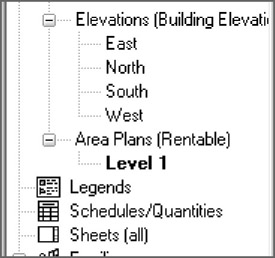
Color fill plans and sections are basically standard views that are color-coded to represent room properties such as department, name, and usage. Area plans are used to convey building usage that extends beyond the shape and size of individual rooms, such as rentable area, office space, and circulation. While plans that are color-coded will appear under the Plans or Sections branch in the Project Browser, area plans have their own branch in the Project Browser, shown in Figure 8.1.