Learning and Applying Solid Edge V20 Step-by-Step

Objectives:
Create a simple sketch using the Sketch command
Dimension a sketch using the SmartDimension command
Revolve a sketch using the Revolve command
Create a hole using the Cutout command
Create a series of holes using the Circular Pattern command
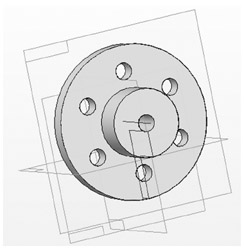
Chapter 2 includes instruction on how to design the part shown below.

Start Solid Edge by referring to "Chapter 1 Getting Started".
After Solid Edge is running, begin a new sketch.
Move the cursor to the upper left corner of the screen and left click on Line as shown in Figure 1.
Move the cursor to the lower left portion of the screen and left click once. This will be the beginning end point of a line as shown in Figure 2.
Move the cursor to the right and left click once as shown in Figure 2.
Move the cursor up and left click once as shown in Figure 3.
Move the cursor to the right and left click once as shown in Figure 4.
Move the cursor up and left click once as shown in Figure 5.
Move the cursor to the left. Ensure that the dots between the first end point and the last end point appear as shown in Figure 6. Left click once.
Move the cursor back to the original starting end point and left click once as shown in Figure 7.
Move the cursor to the middle left portion of the screen and left click on SmartDimension as shown in Figure 8.