Learning and Applying Solid Edge V20 Step-by-Step

Objectives:
Design multiple sketch parts
Learn to use the Front, Top, and Right Planes
Learn to use the Thin Wall command
Learn to use the Shaded with Visible Edges command
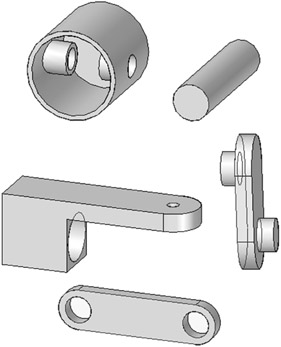
Chapter 6 includes instruction on how to design the parts shown below.

Start Solid Edge by referring to "Chapter 1 Getting Started".
After Solid Edge is running, begin a new sketch.
Move the cursor to the upper middle portion of the screen and left click on Circle as shown in Figure 1.
Move the cursor to the center of the screen and left click once. This will be the center of the circle as shown in Figure 2.
Move the cursor to the right and left click once as shown in Figure 3.
Move the cursor to the upper left portion of the screen and left click on SmartDimension as shown in Figure 4.
After selecting SmartDimension move the cursor over the edge of the circle causing it to turn red as shown in Figure 5. Left click once. The dimension box will be attached to the cursor.
Move the cursor to where the dimension will be placed and left click once as shown in Figure 6.
Move the cursor to the upper middle portion of the screen and enter 2.000 in the dimension box as shown in Figure 7.
Move the cursor to the upper left portion of the screen and left click on Return as shown in Figure 8.
Move the cursor to the...