Applied Electromagnetics Using QuickField™ and MATLAB® is intended
as an introductory level textbook for teaching computer-based electricity,
magnetism and multiphysics. The text is easily accessible to advanced
undergraduates and beginning graduate students in physics and engineering.
Many exercises and demonstrations may be implemented using QuickField and
MATLAB in a traditional introductory level physics course. This second audience
will benefit from the visualization of electric and magnetic field distributions
and force calculations without a working knowledge of the finite element
method or potential theory. Applied Electromagnetics Using QuickField™ and MATLAB® is intended
as an introductory level textbook for teaching computer-based electricity,
magnetism and multiphysics. The text is easily accessible to advanced
undergraduates and beginning graduate students in physics and engineering.
Many exercises and demonstrations may be implemented using QuickField and
MATLAB in a traditional introductory level physics course. This second audience
will benefit from the visualization of electric and magnetic field distributions
and force calculations without a working knowledge of the finite element
method or potential theory.
QuickField is a window-based, Finite Element Method (FEM) software package that supports Electrostatics, DC and AC conduction, Magnetostatics, AC and Transient Magnetics, Steady State and Transient Heat Transfer and Stress Analysis problem types. Models are created in a ‘point-and-click’ CAD environment, where material properties and boundary conditions are assigned. Automatic mesh generation and post processing are fast and user-friendly. Solutions to most problems in the textbook can be displayed in a matter of seconds after the model has been created. The textbook is packaged with a companion CD with a student version of the software capable of solving all the problems in the text. Additional examples are included with the software. The student version of QuickField may also be downloaded from the Tera Analysis website at www.quickfield.com. The user’s guide and demonstration videos are also available on the website. Application-based examples in the text and on the website include the calculation of currents in biological tissue under electrical stimulation, superconducting magnetic shielding, magnetic levitation, electromagnetic nondestructive testing as well as the motion of charged particles in electric fields. Multiphysics applications include coupled stress, electromagnetic and thermal analysis. Students taking a course in electromagnetic theory usually concentrate mostly on analytical techniques, e.g., solving differential equations and boundary value problems. Unfortunately, students often come away with a limited understanding of how electromagnetic fields behave. Computer modeling serves to bridge this understanding gap in that it enables visualization of electric and magnetic fields and electrical currents and therefore builds an intuitive and qualitative understanding that is not readily gained in manipulating complex analytical expressions. Analytical methods developed in this text concentrate on separation of variables, conformal mapping, and Laplace transform techniques. Numerical finite difference and Monte Carlo methods are also introduced with examples in MATLAB. Comparison of numerical solutions with theory helps establish confidence in numerical methods and builds experience in establishing the reliability of computational results and the applicability of theoretical approximations. The book includes extensive problem sets that facilitate computer-based learning of electromagnetics and the application of QuickField and MATLAB illustrating some of the basic concepts in electromagnetic theory such as Gauss’ Law and Ampere’s Law. The exercises are designed to allow user selection of different parameters, dimensions, material properties, and initial conditions. Tables of physical properties and characteristic dimensions of engineering materials and biological materials in living cells and the human body are included in Appendices 4 and 5 for the reader’s convenience. The reader is encouraged to conform, modify, and extend these exercises according to his or her own interests. Chapter 1 introduces mathematical preliminaries and MATLAB concurrently with additional MATLAB examples in Appendix 1. The vector analysis component of Chapter 1 provides simple MATLAB examples calculating vector dot and cross products. The divergence, curl, gradient, and Laplacian are also calculated in different coordinate systems. The Laplace Transform introduced in Chapter 1 is used in chapters on transient magnetics, thermal analysis, stress analysis, and electrical circuit modeling. Analytical and computational methods of solving Laplace and Poisson’s equations are developed in Chapter 2. Readers wishing to jump directly into QuickField may begin with Chapter 3 “A Walk Through QuickField.” This chapter will get the reader started simulating simple electrostatic and magnetostatics problems in QuickField with step-by-step visual instructions for plotting electric and magnetic fields, creating contour graphs, and calculating integral values. Chapters 4 through 10 cover electrostatics, magnetostatics, time-harmonic magnetics, transient magnetics, superconductivity, alternating and direct current flow. Chapters 11 and 12 cover thermal and stress analysis and multiphysics examples with coupled heat transfer, stress and electromagnetic coupling. Applications include space capsule atmospheric reentry simulations that couple thermal and stress analysis as well as modeling the temperature distribution resulting from current flow in a fuel cell. The text concludes with Chapter 13 on passive electrical circuits. QuickField includes a CAD-based electrical circuit simulator that simulates circuits with AC or transient time dependence. Applications include filter circuits and equivalent circuit models of neurons and cells under electrical stimulations. |
 TABLE OF CONTENTS
 Chapter 1 - Mathematical Preliminaries: Vector Anyalysis
In This Chapter
|
A scalar physical quantity is described by a numerical factor with units. In general, the numerical factor will depend on the system of units we choose. Examples of scalars include mass, temperature, and time. Two scalars may be added or subtracted provided they have the same units. For example, it would be meaningless to add scalars of differing units such as temperature and time. Scalars of differing units may be multiplied or divided to form a new scalar, however, such as the average density obtained as the ratio of an object’s mass to its volume. A vector physical quantity is described by a numerical factor with units and a
specified direction. Examples of vectors include electric and magnetic fields and
forces that have a specified direction in space. Vectors are usually designated
with boldfaced symbols such as A in printed work or with an arrow Vector Addition A three-dimensional vector A may be expressed in Cartesian coordinates as
where i, j, and k are unit vectors in the x-, y-, and z-directions, respectively. Ax, Ay, and Az are the components of A along each coordinate axis. Given the vector B = Bxi + By j + Bzk, the vector sum or difference A ± B may be written as
Vector addition is commutative,
In MATLAB vectors are expressed as matrices
Dot Product The dot product, also known as the scalar product, between two vectors A and B results in a scalar quantity that depends on both the magnitude and angle θ between each vector or
Since i · i = j · j = k · k =1 and i · j = i · k = j · k = 0 we have that
The dot product is commutative, that is,
The dot product may also be distributed across a sum
The dot product may be evaluated in MATLAB as follows
Cross Product The cross product between two vectors, A and B, also known as the vector product, results in a third vector that depends on the magnitude and direction of A and B. The magnitude of the cross product is given by
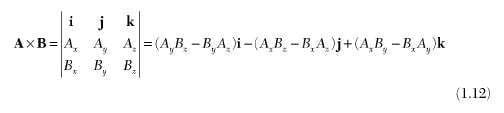
The cross product is zero between parallel vectors and is maximal between orthogonal vectors. In terms of the unit vectors, the cross product may be expressed as a determinant
expanded across the top row. Note that the vector formed by A x B is perpendicular to both A and B so that A • (A x B) = B • (Α × Β) = 0. Interchanging the last two rows in the determinate we can see that A x B = −B x A. The cross product may be calculated in MATLAB as
Triple Vector Product The vector formed by the cross product of three vectors A, B, and C is frequently encountered in vector analysis
A mnemonic for remembering the triple cross identity is the “BAC CAB” rule, where the brackets go on the back.
|
 in handwritten work, such as on a chalkboard or on notebook paper.