3D for the Web: Interactive 3D animation using 3ds max, Flash and Director

Use simple primitive objects to make a realistic button.
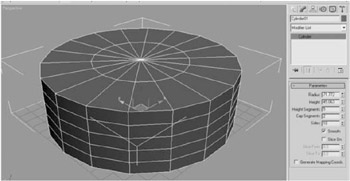
This button is made from two standard primitives. First the button itself is made from a cylinder. Create a cylinder that looks suitably proportioned in the top viewport. Notice that as you make your cylinder there are different parameter counters on the screen. All cylinders are defined by their radius and height. If you are a precise person, you can type values in here to make sure the button is the correct proportion for you. The other options you are given are whether the cylinder is capped top and bottom, how many height segments it has, and how many sides make up the perimeter. You can see in this perspective view that this cylinder has 5 height segments and 18 sides. It also has two cap segments (Figure 1.2).
| Note | Whenever you set out to build anything in 3D, it is a good idea to think about these extra parameters, as they are the key to the all important face count when transferring to Shockwave. More of this later. Because your button will end up as a still at this at this stage, we can be as generous as we like with our face count. |
| Top Tip | It is usual to keep the three orthographic views as showing objects in Wireframe, and the perspective viewport showing... |